


GPS Tracker Installation Guide: Wired vs Plug-and-Play
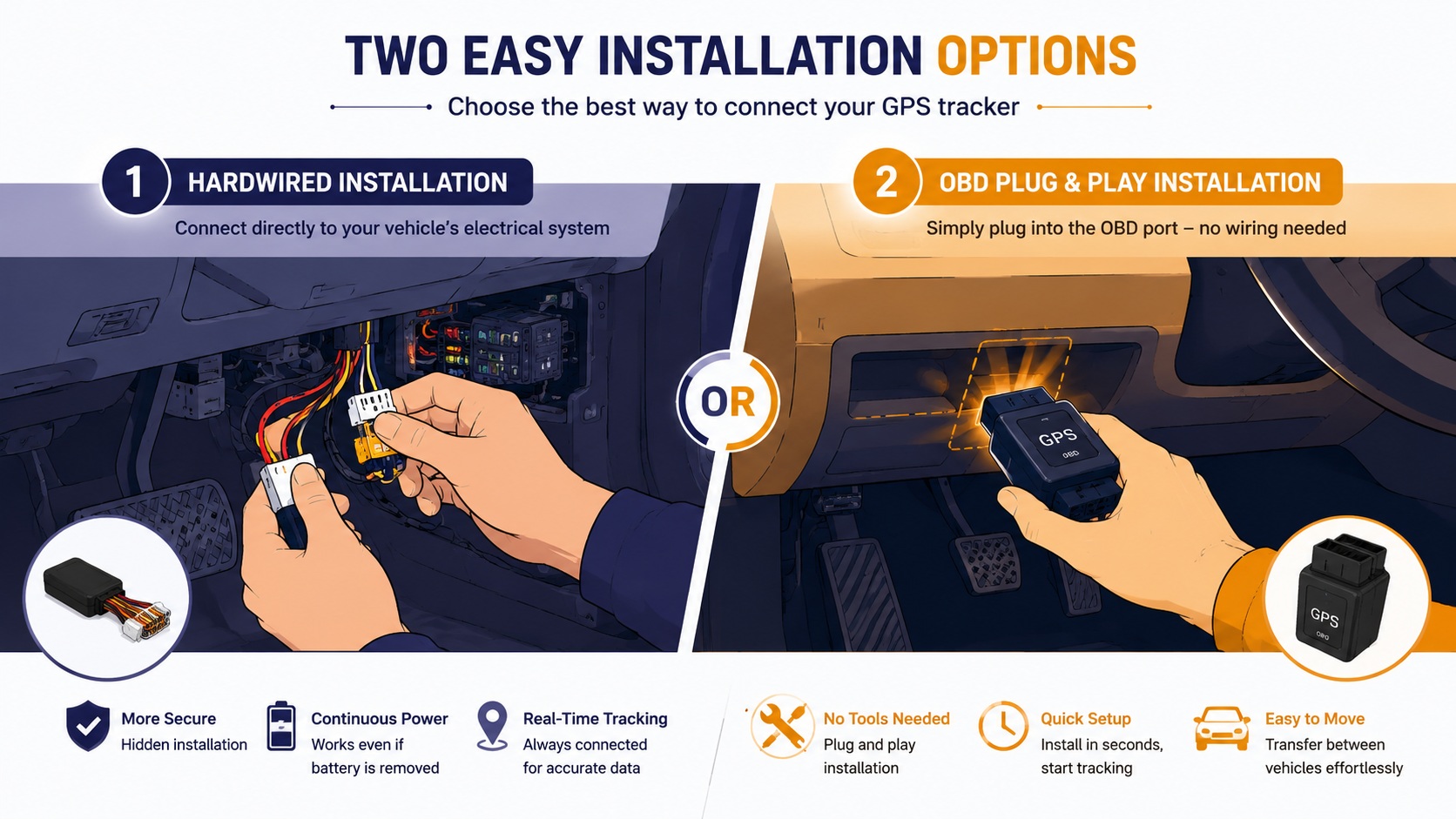
GPS Tracker Installation: Wired vs Plug-and-Play in Qatar, UAE & Saudi Arabia
Everything you need to decide how your vehicle tracker should be installed — cost, difficulty, hidden placement, and which option actually suits your situation.
One of the most common questions car and fleet owners across the Gulf ask before buying a GPS tracker isn't which brand to choose — it's how the thing actually gets installed. The installation method affects reliability, battery life, theft-resistance, and even how quickly you can start using the device. This guide compares the two main installation types in detail so you can pick the right one for your vehicle and situation.
🔌 The Two Main Installation Types
Almost every consumer and commercial GPS tracker on the market falls into one of two installation categories. Understanding the tradeoffs between them is the single most useful thing you can do before buying, because switching later usually means buying a different device entirely.
🔧 Wired (Hardwired) Trackers
- Connected directly to the vehicle's battery or OBD-II port
- Continuous power — no need to ever recharge
- Supports advanced features like remote engine cut-off
- Usually requires a technician for correct, hidden installation
- Harder for a thief to quickly locate and remove
🔋 Plug-and-Play / Battery Trackers
- No wiring — plugs into the OBD port or runs on internal battery
- Self-installable in minutes, no technician needed
- Great for rental cars, temporary use, or asset tracking
- Battery needs periodic charging or replacement
- Slightly easier for a thief to spot and remove if not concealed well
🧭 Which One Should You Choose?
The right choice really comes down to how long you'll use the vehicle, whether it's owned or rented, and how serious your theft-protection needs are.
📋 Installation Comparison at a Glance
| Factor | Wired Tracker | Plug-and-Play |
|---|---|---|
| Installation Time | 30–60 minutes, technician recommended | 2–5 minutes, self-install |
| Power Source | Continuous, from vehicle battery | Internal battery or OBD power |
| Hidden Placement | Easy to conceal deep in the dashboard/wiring | Limited to OBD port location or visible spots |
| Engine Cut-Off Support | Yes, on most models | Rare, only on select OBD units |
| Best For | Owned vehicles, fleets, long-term use | Rentals, temporary tracking, DIY users |
🛠️ Step-by-Step: Getting a Wired Tracker Installed
⚡ Step-by-Step: Setting Up a Plug-and-Play Tracker
🌡️ Climate Considerations for Gulf Installations
Extreme summer heat across Qatar, the UAE, and Saudi Arabia — where dashboard temperatures can climb dramatically in parked vehicles — makes device placement more important than in milder climates. When installing any tracker:
- Avoid placing battery-powered units in direct sun exposure zones like the dashboard surface or rear window shelf, since heat degrades battery lifespan faster.
- Prefer installation points with some airflow or shade, such as under the seat or inside a center console, both for wired and plug-and-play units.
- Ask your installer whether the specific tracker model is rated for high-temperature operation, since not all consumer electronics handle extended heat exposure equally well.
🚫 Common Installation Mistakes
Placing the device somewhere visible defeats the anti-theft purpose entirely.
Always confirm live tracking works before relying on the device in an emergency.
A tracker with no backup power is useless the moment its main wire is cut.
Incorrect wiring can drain the car battery or damage the vehicle's electrical system.
🏢 Choosing an Installer or Provider
The device itself is only half the equation — who installs it and supports it afterward matters just as much, especially for wired trackers. Before committing to a provider, it's worth asking a few practical questions that separate a reliable long-term partner from a seller who disappears after the sale.
Ask whether installation is included in the price or billed separately, and whether the installer is the manufacturer's own technician or a third-party garage they've simply referred you to. A provider who trains and certifies their own installers tends to produce more consistent results than one who outsources the job to whichever workshop is nearest. It's also worth asking how warranty claims are handled if the device fails — some providers require you to return the unit to a specific service center, which can be inconvenient if you're based outside a major city.
For fleet buyers, ask specifically about bulk installation scheduling. Installing trackers across ten or twenty vehicles one at a time creates operational downtime, so a provider who can schedule a mobile installation team to visit your depot over one or two days is often worth paying a small premium for, compared to sending vehicles to a workshop individually.
❓ Frequently Asked Questions
Can I install a GPS tracker myself?
Plug-and-play and OBD-port devices are designed for self-installation and typically take just a few minutes. Wired trackers, on the other hand, involve connecting directly to the vehicle's electrical system, and while technically possible for someone experienced with car wiring, it's generally recommended to use a professional installer to avoid damaging the vehicle's electronics or triggering warning lights on newer cars.
Will a GPS tracker drain my car battery?
A correctly installed wired tracker draws a very small amount of current and is designed to work alongside the vehicle's existing electrical system without noticeably affecting battery life. Problems typically arise only from poor-quality installation or a faulty device, which is another reason professional installation is worth the extra cost for hardwired units.
How long does a plug-and-play tracker's battery last?
This varies significantly by device and how frequently it reports location. Devices set to report every few seconds will drain faster than ones set to check in every few minutes. If you're using a battery-only tracker for long-term monitoring rather than short-term or temporary use, factor in a realistic recharging or battery-replacement routine rather than assuming a single charge will last indefinitely.
Can someone find and remove my GPS tracker?
A poorly hidden tracker can be found relatively easily, which is why installation placement matters as much as the device itself. Wired trackers hidden deep within the dashboard or wiring harness are considerably harder to locate during a quick inspection than a visible OBD plug-in unit sitting right under the steering column.
Do I need a different tracker for extreme summer heat?
Not necessarily a different tracker, but definitely a different installation location. Most consumer-grade trackers are rated for a reasonable operating temperature range, but placing any device in direct, prolonged sun exposure inside a parked vehicle during Gulf summers can shorten its lifespan regardless of the manufacturer's rating. Choosing a shaded, ventilated mounting point solves this in almost all cases.
✅ Final Thoughts
There's no universally "better" installation type — only the right one for your situation. Wired trackers offer the strongest theft protection and advanced features like engine cut-off, making them the better choice for owned vehicles and business fleets. Plug-and-play units win on convenience and flexibility, ideal for rentals, temporary tracking, or anyone who wants to avoid a workshop visit. Whichever you choose, prioritize a hidden, well-ventilated placement and always test the live connection immediately after setup — that five-minute check is what actually determines whether the tracker does its job when you need it most.
📍 Still Deciding Which Tracker Fits Your Vehicle?
Compare wired and plug-and-play GPS tracker models built for real-world conditions, with clear installation guidance for every device.
One thought on “GPS Tracker Installation Guide: Wired vs Plug-and-Play”